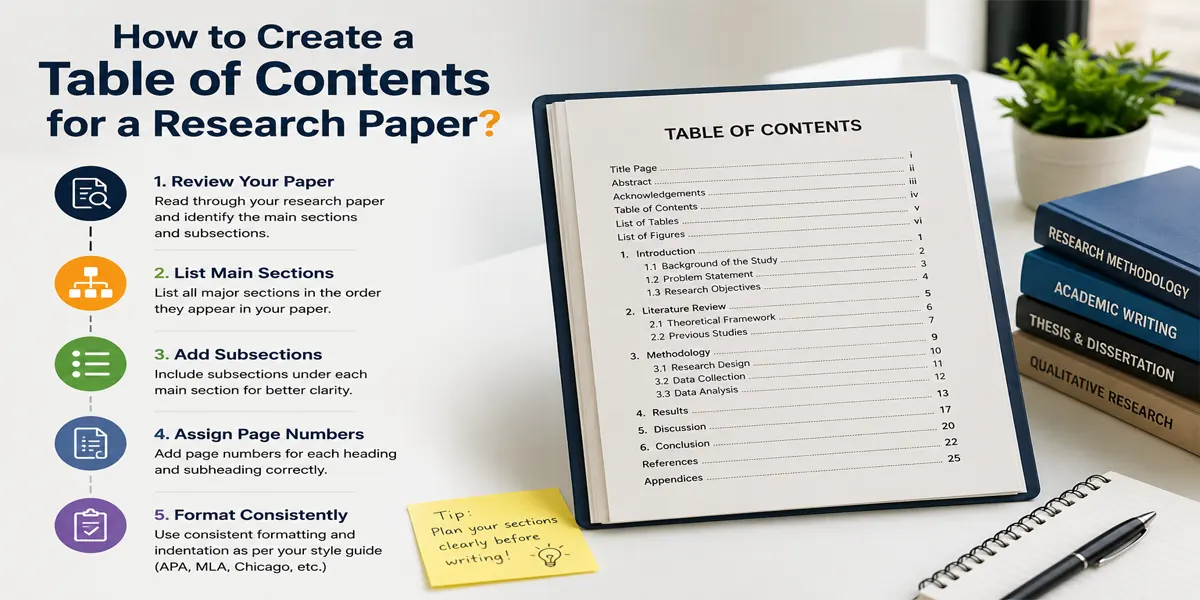
After you have invested a lot of time and effort in crafting a research paper, you must structure it properly if you want to stand out from all other students. In that regard, you cannot skip one of the most important sections- the table of contents(TOC). It is placed after the title page, abstract, and acknowledgment section.
TOC is a list of chapter titles, major section headings, subheadings, and their corresponding page numbers. Think of it as a blueprint of your research paper, as it provides a quick overview of the research paper, helps readers locate specific sections without going through the entire document, demonstrates the flow of the research paper, including the order of the topics and how the sections connect, reflects professionalism, and helps readers understand the depth of the research. Furthermore, tools like MS Word have simplified this process due to automatic table of contents generation.
If you are looking for Research paper help or want to learn how to create a Table of Contents for a Research Paper, then you're in the right place.
What Is a Table of Contents?
A table of contents is an organised and structured list that outlines the sections or chapters and lists their page numbers.
- Title of each section.
- Corresponding page number
- Subheadings.
It serves as a roadmap for your research paper. Imagine you are reading a research paper without a table of contents. Will you be able to locate specific sections? No. Will you be able to understand the scope of the research? No. Will you be able to understand the arrangement of the topics? No.
Therefore, never underestimate the significance of a table of contents.
With a quick overview of a table of contents, readers can immediately understand the organisation and structure of the entire paper in a few seconds.
A typical structure of a research paper includes an introduction, literature review, methodology, results, discussion, conclusion, and references. In addition, it also includes subsections such as theoretical framework and research gap under the literature review.
A table of contents is essential as not every reader is willing to scroll through dozens of pages. Instead, they look for ease of navigation so they can directly jump to the relevant page.
It is particularly useful for the assessor as they can understand the scope and structure of the research paper in a few seconds. For the writer, a table of contents is useful to identify issues beforehand; for example, if the headings seem confusing, repetitive, or out of order, the table of contents will make those problems obvious.
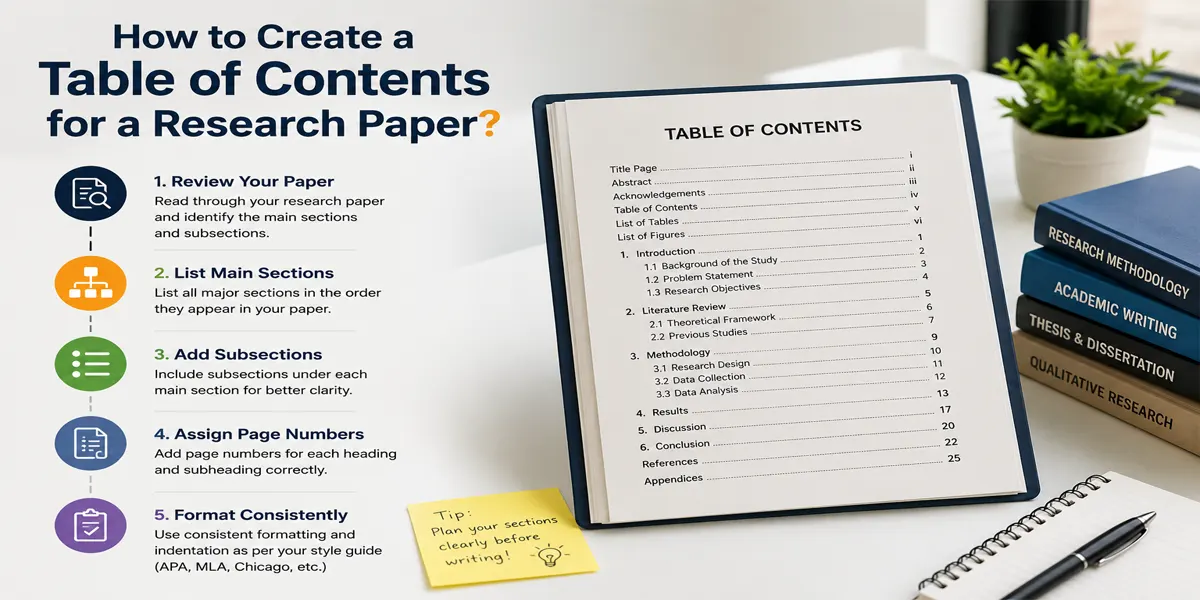
How to Create a Table of Contents for a Research Paper?
If you are creating a table of contents, it doesn't necessarily have to be complicated.
1. Organize headings and subheadings:
The first step is to start by deciding how your research will be divided. Depending on the topic and academic requirements, it may include:
- Introduction
- Literature reviews
- Methodology
- Results
- Discussions
- Conclusion
- References
Furthermore, you can divide the major sections into relevant subsections such as
1. Literature reviews
2.1 Previous studies.
2.2 Theoretical framework.
2.3 Research gap.
The key to perfection is logical hierarchy. It includes representing the main topic as main headings and supporting topics as subheadings. Moreover, you must avoid creating dozens of tiny sections.
2. Apply heading styles:
After organizing the headings, apply consistent formatting to them. For example, if you are using Microsoft Word, then you can select a heading and choose Heading 1, 2, or 3 from the style sections.
A typical structure is:
- Heading 1: Main sections.
- Heading 2: Subsections
- Heading 3: Smaller division within a subsection.
For example:
- Heading 1: 2. Literature reviews.
- Heading 2: 2.1: Previous studies.
- Heading 2: 2.2: Theoretical framework
- Heading 2: 2.2.1: relevant theories
Moreover, this step is a lot crucial, as Word uses these headings to automatically generate your table of contents. (Simply making the text bold or increasing its font size doesn't tell Word that it is a heading)
3. Add page numbers:
A table of contents needs accurate page numbers so it is easy for the reader to locate specific sections. First, make sure that your research paper has page numbers in the correct locations. Then check your university requirements, as institutions use different numbering systems for the preliminary pages and the main body. Next, you must also confirm whether your title page should display a page number (table of contents format requirements vary between universities, departments, and referencing styles)
4. Create the TOC:
Once your headings and page numbers are properly formatted and the table of contents is ready, in Microsoft Word, you can place your cursor where you want the contents page to appear (it comes after the title page and before the main body in the research paper)
Then you go to References and Table of Contents. From there, you can choose one of the automatic table styles. Word will use your heading styles to create the table of contents page, such as the headings, hierarchy, and page numbers.
5. Review and update it:
Creating the table of contents is not the last step. This is because research papers often change during the crafting process. You may add a new section, move content, or cause the pages to shift. As a result, you will also have to edit your original table of contents.
Before submission, you must update your paper. In Word, you can right-click your table of contents and select Update Field; you can choose to update only the page numbers or the entire table.
Once your table of contents is final, review it manually. Check that every important section appears, heading names align with the actual document, language is correct, heading levels are consistent, indentation reflects the hierarchy, and no unwanted headings have been included.
This will make your research paper look polished.
How to Create a Table of Contents in Microsoft Word?
To make an automatic table of contents in Microsoft Word, apply built-in heading styles to your section titles, place your cursor where you want the list, and select an automatic style from the References tab. Word will build the directory and page numbers for you instantly.
-
Apply Heading Styles: Highlight your chapter title or section header. Go to the Home tab on the top ribbon. Select Heading 1 for main titles, Heading 2 for subheadings, and so on in the Styles gallery. Repeat this for all the main sections in your document.
-
Insert the Table of Contents: Click to place your cursor exactly where you want the table to live (usually on a blank page at the start of your document). Click the References tab. Click Table of Contents. Choose an Automatic Table style from the menu.
-
Update or Edit Your Table: If you change your text or add new pages, click on your table of contents. Click Update Table or right-click the table and choose Update Field. Choose to update Page numbers only or the Entire table to include new headings.
This approach is advantageous as you can update the table of contents whenever your document changes. For example: if your methodology section increases from page 12 to page 15, the page numbers can easily be updated without editing it manually.
Also, you must create a table of contents based on your academic requirements.
Research Paper Table of Contents Example
Here is an example of how a research paper TOC looks:
1. Introduction ................................................................................. 1
1.1 Background of the Study ............................................................. 1
-
-
1.2 Statement of the Problem .......................................................... 3
-
1.3 Research Objectives ................................................................. 5
-
2. Literature Review ....................................................................... 6
-
-
2.1 Theoretical Framework ............................................................... 6
-
2.2 Previous Studies ....................................................................... 9
-
2.3 Research Gap.......................................................................10
-
3. Methodology ............................................................................. 14
-
-
3.1 Research Design .................................................................... 14
-
3.2 Data Collection ....................................................................... 16
-
3.3 Data Analysis ........................................................................ 19
-
4. Results and Discussion ........................................................... 22
-
-
4.1 Presentation of Findings ........................................................ 22
-
4.2 Discussion of Results ............................................................. 28
-
5. Conclusion .............................................................................. 35
-
-
5.1 Summary of Findings .............................................................. 35
-
5.2 Recommendations ................................................................. 37
-
-
References ................................................................................ 39
-
Appendices ................................................................................ 43
This table of contents example shows the relationship between headings and subheadings; the indentation is useful to see which section belongs to which chapter or major heading.
Are You Feeling Overwhelmed by Your Research Paper?
Don’t let complex research, writing, formatting, and deadlines hold you back. Get the right guidance and support at every stage to create a well-structured, clear, and high-quality research paper with greater confidence.
Let’s Connect!

Formatting Tips & Common Mistakes
You must also keep some formatting tips in mind when preparing your table of contents.
Keep the formatting consistent:
The heading style must follow a consistent pattern throughout the research paper. If one heading uses a particular style, then other headings at the same level should use the same style.
Use clear alignment:
The page numbers should generally line up neatly on the right side of the page; for this, use leader dots.
Maintain proper indentation:
The different heading levels should be visually distinguishable. Main headings must be at the left margin, and sections must be slightly indented.
Check the page number carefully:
One of the most common mistakes when writing a table of contents page is incorrect page numbering. For example, if you are adding new material but not editing the contents page, then it will be inaccurate.
Additional tips and mistakes to avoid:
- Avoid manually typing the table of contents.
- Do not include every tiny heading.
- Match the actual document.
- Follow your university formatting requirements.
Conclusion:
A table of contents is not a mere decorative page at the start of a research paper; instead, it provides readers with a clear overview of the work and makes navigation and readability better. You must start by organising headings and subheadings, apply the word’s built-in heading styles, add page numbers, add an automatic TOC, and update it after the final edit; moreover, you must pay close attention to the alignment, indentation consistency, and accuracy of the page numbers. Also remember that academic requirements can very therefore, follow the formatting instructions provided by your university or instructor.
FAQs
1. Does every research paper require a table of contents?
No, a brief research paper may not require one; however, long research papers, dissertations, and research reports often do.
2. Where should the table of contents appear?
It appears at the start of the research paper after the title page.
3. How many heading levels should I include in a table of contents?
This depends on your research paper as well as your academic requirements. However, headings and subheadings are enough.
4. Can I create a table of contents manually?
Yes, you can, but an automatic table of contents is better.
5. Why are my headings not appearing in the Word table of contents?
It is because the headings were formatted manually instead of using Word's built-in heading styles. You can apply Heading 1, Heading 2, or Heading 3 as needed and then update the table of contents.